


How We Designed a Robust Full-Auto CD Pipeline

.png)
Context
In May 2025, we simplified our CI/CD setup by consolidating a mix of CircleCI and GitHub Actions into a single GitHub Actions workflow.
This presented a golden opportunity to reconsider our "manual-approval" deployment strategy and move to a fully automated CD model.
This post discusses how we built this fully automated CD pipeline from the ground-up.
A smooth, forgettable experience
Ideally, the developer CD experience should boil down to:
- Write a pull request (PR)
- Ensure PR quality (CI, code review)
- Merge to trunk
Once merged, the developer can immediately switch to other tasks, knowing that this change will safely get deployed in a timely manner. I.e. a "merge-and-forget" workflow.
Building a continuous deployment (CD) pipeline is conceptually simple, but the details require careful attention. In this article, we'll discuss how we address some critical details for a robust pipeline.
Scope tightly, build it well
We have a lean and mean Platform engineering function, enabling a fast moving product engineering organization. It means we must focus on building something of a very minimal specific scope, that works very well:
- It must be simple to build / debug / explain / observe.
- One person will build it, but everyone else needs to use it and understand it easily without much ramp up.
- It must scale with high and growing development velocity.
- Solution should support growth trajectory for a while without reworks (say 12-18 months).
- It must be performant and reliable
- It must not introduce significant overhead relative to absolute time it takes to run a CI suite, or to do a deploy. It should be reliable enough such that default assumption when something goes wrong is that “something else broke”.
Batching deploys
Deployments take time—typically around 15 minutes at Nooks. Meanwhile, developers may merge commits much more frequently than this. We also want to run deploys one at a time.
Without batching, deploying every commit creates a bottleneck. Deployments queue up, each waiting for the previous one to finish, potentially causing unbounded delays between merge and production.
Concurrency group
GitHub Actions' concurrency groups solve this naturally. Configure a concurrency group for your deployment workflow to ensure only one deployment runs at a time.
The config below says that only a single workflow with the group cd-deploy may be running at a time.
concurrency:
  group: cd-deploy
  cancel-in-progress: false
Queuing policy
Ensuring progress
With cancel-in-progress: false, new commits arriving during an active deployment get queued rather than canceling the current run.
This approach is crucial.
While our systems prevents “half-deployed” states, constantly interrupting deployments means we may not make progress at all. Letting each deployment complete ensures forward progress while batching efficiently handles high commit velocity.
Lonely queue
When cancel-in-progress: false the queue holds at most one pending deployment—the most recent commit waiting to deploy. Any later arrivals will replace the current queue occupant.
This "last-arrival-wins" behavior is perfect! If multiple commits arrive during a deployment, only the newest needs to be deployed next, since it incorporates all previous changes.
Deployment order
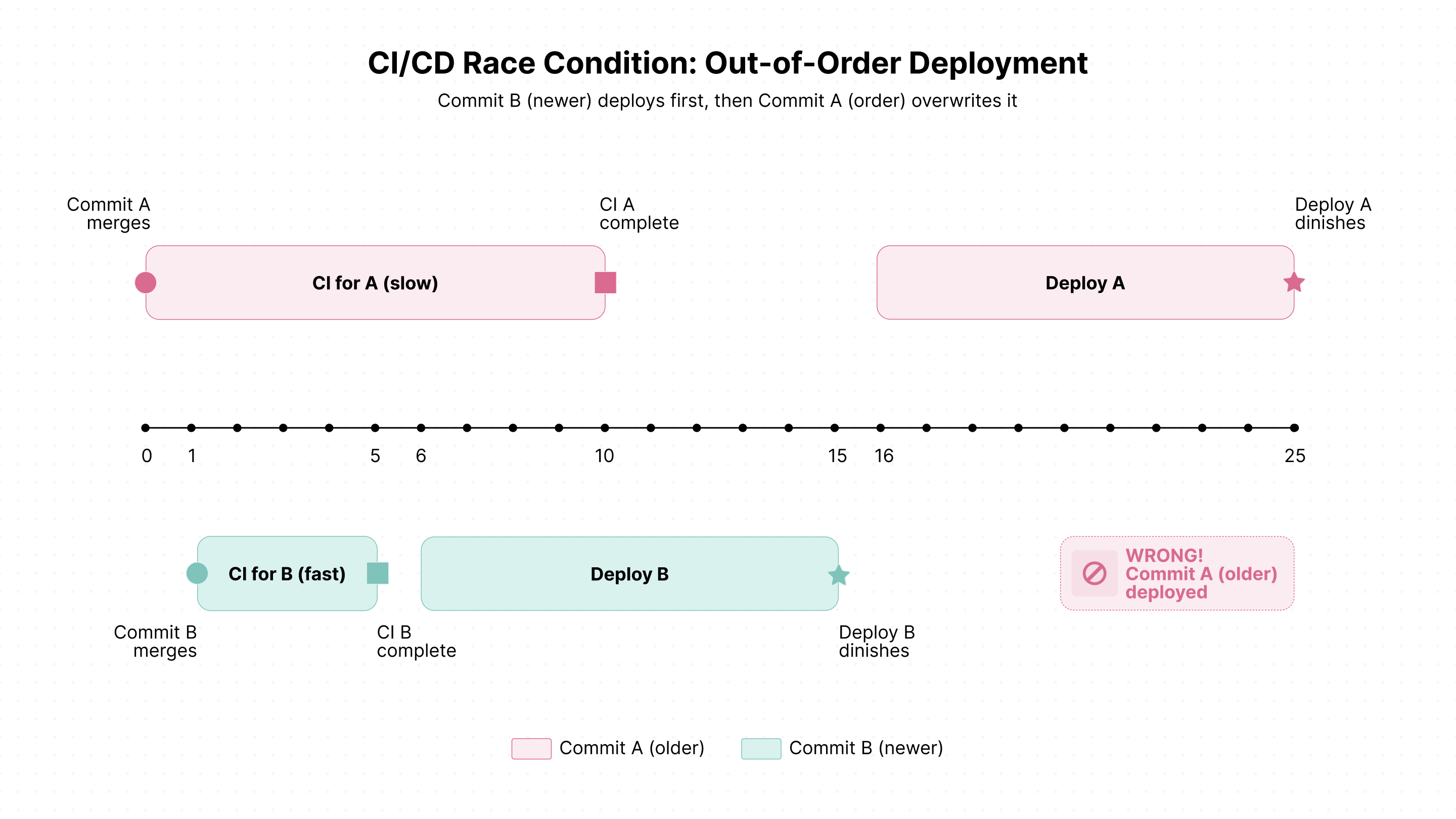
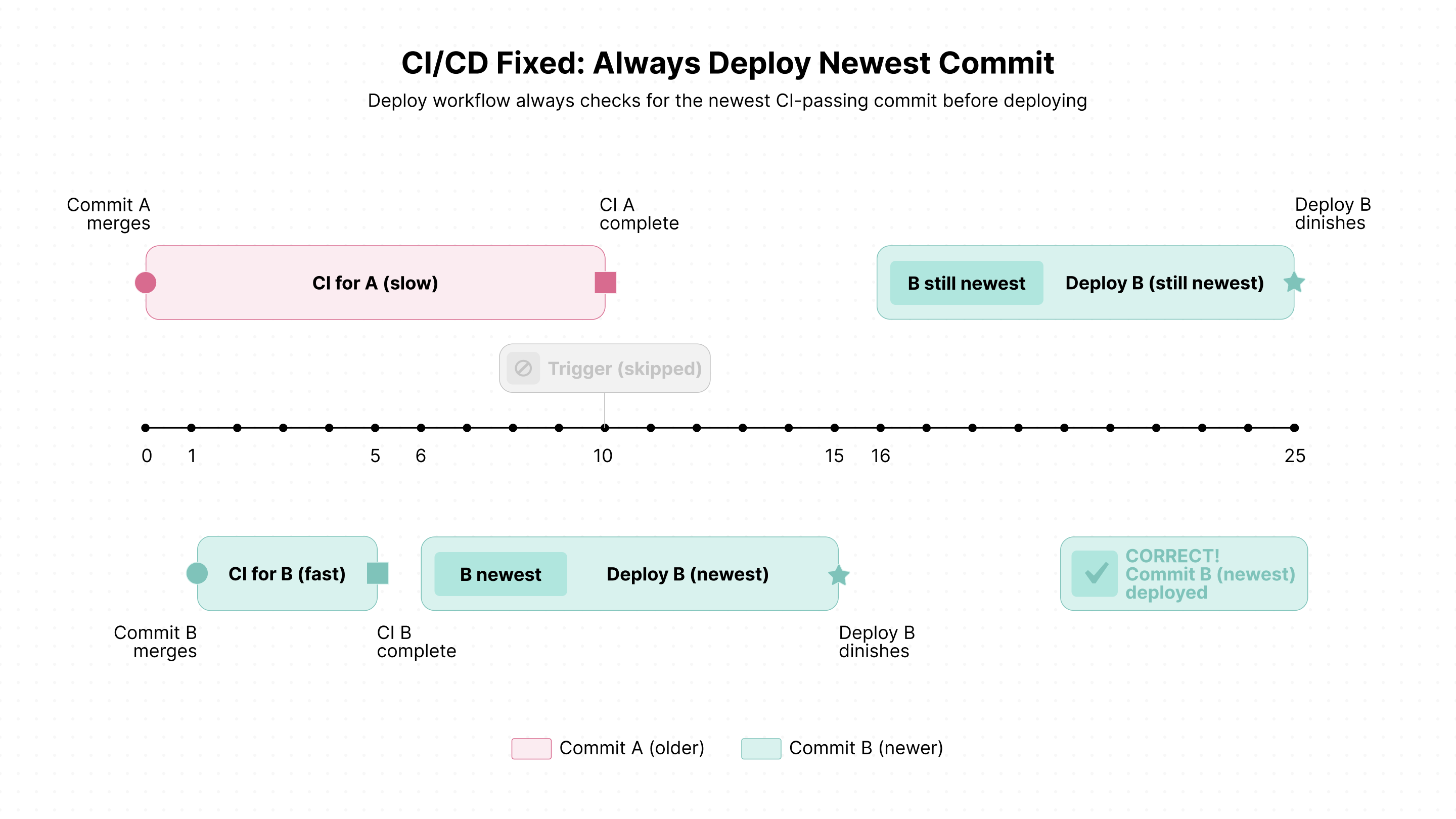
Displaying deployment state
Batching and queueing can make deployment progress opaque to engineers.
Common questions arise:
- "I just merged it, why isn't it deployed yet?"
- "Why doesn't the current deploy job contain my commit?"
We use Slack heavily as our (only) corporate messaging system. Integration is easy and works well for communicating deployment status:
- CI phase notifications: When merged commits enter or exit the CI phase, the system sends a direct message to the commit author (with
@mention) - Deploy phase notifications: When a batch of commits enters or exits the deploy phase, the system sends a message to the global "#cd-status" channel
This gives the relevant feedback without any prompting or digging by engineers.
Break-Glass Mechanisms
While we dream of all encompassing automated systems, we are not quite there. We implemented emergency procedures for bypassing normal deployment safeguards. We trust our engineers to exercise adequate judgement in invoking these break-glass mechanisms.
Deploy Without CI
Nooks uses a "Deploy without CI" pull request label to streamline urgent deployments.
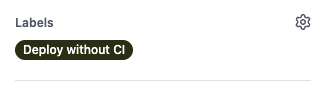
After a commit merges and enters the CI phase, the system looks up the originating pull request. If the label is present, CI is skipped entirely and deployment begins immediately.
This lets developers bypass CI checks post-merge when necessary, while still requiring PRs to pass CI before merging. Code review standards remain intact while providing flexibility for time-sensitive deployments.
Turning Off CD Temporarily
Nooks uses GitHub Actions repository variables to control the CD system. Repository administrators set the ENABLE_CD variable to true or false to enable or disable automated deployments.
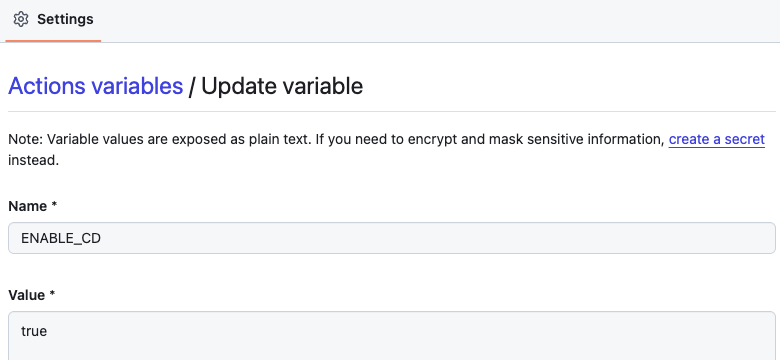
When ENABLE_CD=false, deployment triggering is disabled system-wide, preventing automatic deployments. This provides a simple, centralized way to pause CD during incidents, maintenance windows, or situations requiring manual control.
Manually Deploying a Specific Commit
When in a ENABLE_CD=false state, the next requirement is to be able to trigger deploy pipeline with full control over timing AND commit. It must be possible to choose a specific commit to deploy in such cases.
We designed the workflow dispatch definition of the GHA deploy pipeline to support this use case (i.e. bypass batching / “latest eligible commit” selection). In fact we can even ignore “CI tests passing” requirement.
This is a bit low tech, but it’s simple to understand, and is slightly better than hardcoding.
Future Work in Nooks CI/CD
Nooks is growing rapidly. We maintain high development velocity—customers love that we ship features quickly. To scale sustainably, we're continually invest in our CI/CD infrastructure.
Speed Optimizations
- Compute infrastructure: Upgrade to faster runners and optimize resource allocation
- Build systems: Implement incremental builds and optimize build configurations
- Test frameworks: Adopt faster testing frameworks and optimize test execution
- Parallelization: Maximize parallel execution of tests and builds across multiple agents
- Caching strategies: Implement intelligent caching at every layer—dependencies, build artifacts, and test results
Intelligent Skipping
The fastest way to run something is to not run it at all. We're investing in smarter detection:
- Affected services detection: Only build and test services impacted by code changes
- Skip redundant deploys: Detect when a commit is already deployed and avoid redeployment
- Selective test execution: Run only tests relevant to changed code paths
- Configuration-only changes: Fast-track deployments that only update configuration without code changes
Reliability
GitHub Actions hosted runners run exclusively on Azure. Any Azure outage blocks all deployments, including critical hotfixes.
To mitigate this single point of failure, we're exploring multi-cloud strategies:
- Integrate multiple GHA runner vendors: Use services like BuildJet, Namespace, or other providers on different cloud platforms (AWS, GCP). This enables automatic failover when one provider experiences issues.
- Deploy self-hosted runners across multiple clouds: Maintain our own runner infrastructure across AWS, GCP, and Azure. This provides maximum control and cloud diversity, though it requires more operational overhead.
Both approaches significantly reduce our exposure to single-cloud outages while preserving the familiar GitHub Actions workflow. This is just one of the many novel technical challenges our team tackles every day. If you’re interested, check out our open roles!



.png)
.png)